
The online cancellation form #
The online cancellation form makes it easier for clubs to support membership cancellations through a simple, accessible online process.
Clubs that sell memberships online are now required to offer a clear and simple way for members to cancel memberships online. The cancel portal form provides a streamlined and compliant method for handling these requests.
Key features #
- Member-friendly interface: a simple, mobile-friendly form for members to request cancellation.
- Automated notifications: clubs receive immediate alerts when a cancellation request is submitted to the email you provide.
How it works #
- A member visits your cancellation page.
- They fill out a short form confirming their intent to cancel. Any member can submit the form, even if their membership was not purchased online.
- You receive the request via email (or through your cancellation report).
- Process the cancellation according to your policies. If the member is not eligible to cancel for any reason, follow up to inform them of the reasoning.
Enable the cancellation form #
To activate this feature for your club:
- Configure the desired email address for cancellation requests at Client Preferences > Member > Preferences > Cancellation request email.
- Configure your club's specific cancel terms at Client Preferences > Member > Cancellation Settings. Define the terms; they appear above the button on your cancel page. If nothing is specified, the following text is shown: "I understand that by submitting this form I am requesting that my membership with {club name} be cancelled. Cancellation is subject to the terms and conditions of my agreement with {club name}."
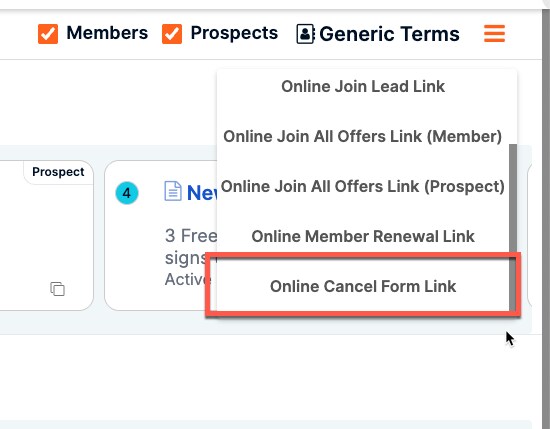
- Access the link to your cancellation form from offer builder using the drop-down in the upper right corner.
- Add the link to your webpage.
Once these steps are complete, you receive email notifications for any requests submitted through your page.
Cancellation reasons configuration #
For consistent reporting and trend tracking, configure a predefined drop-down list of cancellation reasons in the Cancellation and Freeze Reasons settings (see Cancellation and freeze reasons in the Settings sub-section). Free-text reasons make reports much harder to roll up. The same predefined reasons apply when cancelling an add-on (see Add-ons and charges).
FAQs #
Can cancellation requests be viewed in a report from ASF? Yes, this is available as part of the existing cancellation report.
Need help? #
Contact your ASF account manager at clientsupport@asfpaymentsolutions.com.