
Voiding a transaction #
A void completely cancels a transaction as if it never occurred. Voids are only available until 11:59 PM on the same business day the transaction was processed. After that deadline, contact ASF Client Support at 1 (800) 527-6898. Voiding ASF dues transactions always requires a support call, regardless of timing.
- Navigate to Facility Transaction History or Member Transaction History from the MyPOS main screen.
- Locate the transaction and expand it by clicking the Order ID.
- Select Void in the upper-right corner of the transaction detail.
- Confirm the void action when prompted.
Returning items #
Returns process a refund for eligible items. Member dues and personal training sessions cannot be returned through MyPOS.
- Open Facility Transaction History or Member Transaction History.
- Find and expand the original transaction.
- Select Return.
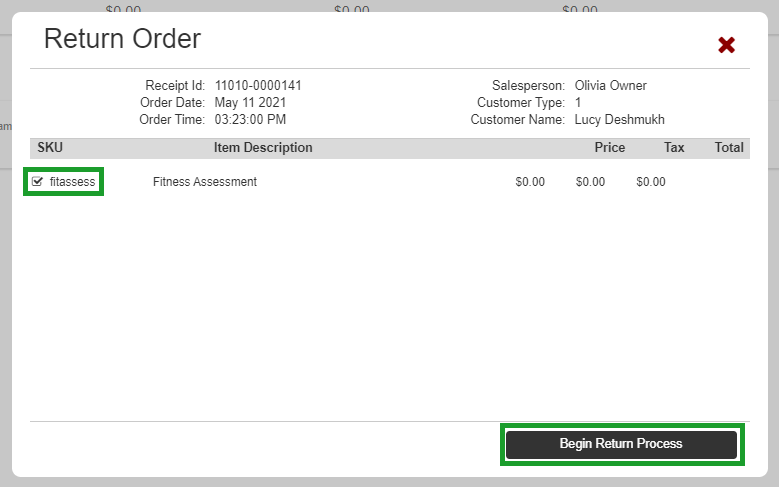
- Check the items you want to return (items that cannot be returned are grayed out).
- Click Begin Return Process. The system pre-populates the member, salesperson, and original discounts.
- Select the appropriate cash drawer.
- Click Pay.
- On the payment screen, use the original payment method for the refund.
- Click Process Refund, then Finalize Order.
The return appears in transaction history with the original Order ID as a reference.

Where to go next #
- To view all transactions for a location, see Reports.
- For a full transaction walkthrough, see Run a MyPOS transaction.
Need help? #
Contact ASF Client Support at 1 (800) 527-6898 for void requests after the same-day deadline, or reach your account manager at clientsupport@asfpaymentsolutions.com.