
What sessions per payment does #
Sessions per payment lets you bundle My Scheduler class or personal training sessions with membership dues at no additional charge. Members automatically receive a predetermined number of session credits each time their dues are collected. This is useful for memberships that include a set number of training sessions per billing period.
Prerequisite #
Session items (Scheduler Buckets) must first be created in Inventory Management before they can be added to an offer. Contact your ASF account manager if session inventory items are not yet set up.
Part 1: Manage session buckets for the offer #
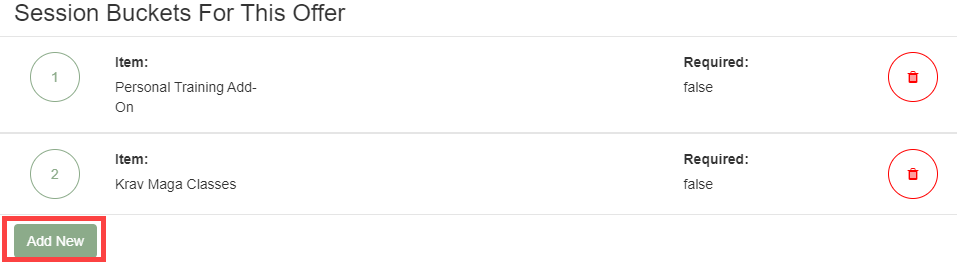
In Offer Builder, open the offer and select Manage Session Buckets to configure which session items are available for this offer and how many members must or can select.
- Minimum Required Session Buckets: The lowest number of session items a member must select during sign-up. Applies only when multiple session items are available.
- Maximum Allowed Session Buckets: The highest number of session items a member can select during sign-up. The maximum cannot be less than the minimum.
To add session items to the offer:
- Click Add New and select the inventory item (Scheduler Bucket) from the list.
- Optionally mark the item as Required to force member selection during sign-up.
- Click Save to confirm each addition.
Part 2: Set session quantity in the payment term #
Inside the payment term for the offer, locate the Session Buckets section. Configure how many sessions are included per payment period.
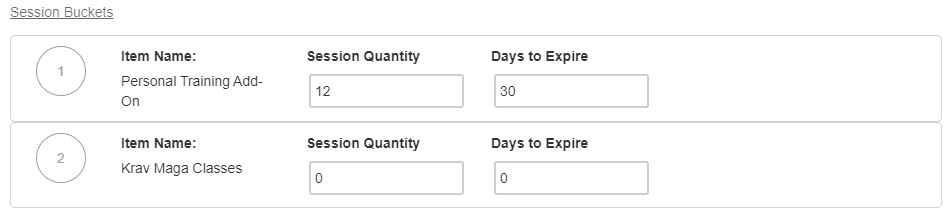
- Session Quantity: The number of sessions added to the member's account each time the dues payment is collected.
- Days to Expire: The number of days after which unused sessions expire. Set to 0 for sessions that never expire.
Note: If a session item on the offer is not being used for a particular payment term, set both Session Quantity and Days to Expire to 0 for that item.
Need help? #
Contact your ASF account manager at clientsupport@asfpaymentsolutions.com.