
What offer settings control #
Offer settings let you tailor how and when members are billed and when their membership begins. These configurations support billing cycle alignment, proration management, and regional compliance requirements.
Offers are created and managed in Offer Builder, accessible from the My Apps page. Select + Offer to begin a new offer.
Payment timing settings #
The following payment timing options are available. Each addresses a distinct billing scenario. It is not recommended to use more than one of the following settings on the same offer simultaneously, as they may conflict: First Full Payment Day, Fixed First Payment Date, and Payment Date Offset.
Standard setup (no special settings applied)
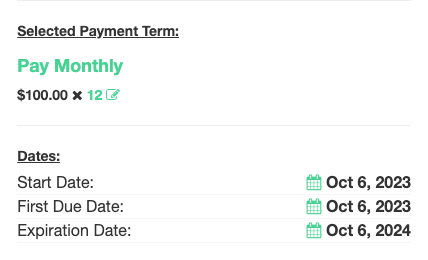
When no payment timing settings are applied, the first payment is due on the day the member joins and the membership begins that same day.
Example: Member joins October 6. First payment due October 6, 2023. Membership starts October 6, 2023. Expiration October 6, 2024.
Aligned billing with prorated dues
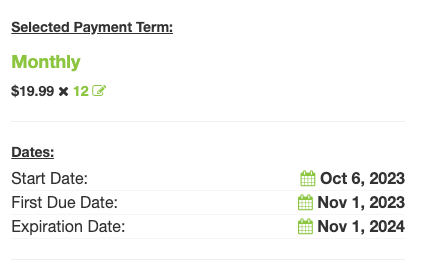
Use this setting when you want all members billed on the same calendar day each month. The member pays a prorated charge at sign-up covering the partial first billing period, then full payments begin on the aligned date.
Example: Billing day = 1st of month, join date = October 6. Prorated charge covers October 6-31. First full payment due November 1, 2023. Renewal payment due November 1, 2024.
Calendar billing (no proration)
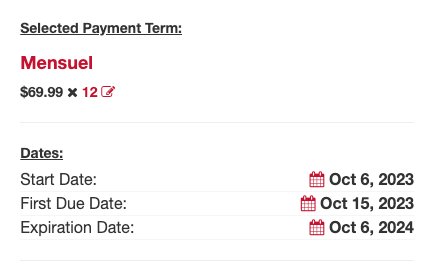
Use this setting when billing must always occur on a fixed date with no prorated charge at sign-up. This is common in regions such as Quebec where payment regulations limit the number of dues collections per year.
Example: Fixed billing day = 15th, join date = October 6. First payment due October 15, 2023. No prorated charge collected.
Payment date offset
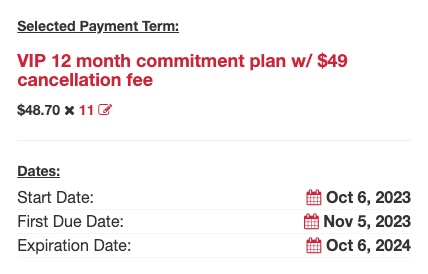
Use this setting when you want to delay the first payment to avoid billing a member for sign-up fees and dues in the same month. The membership begins on the join date, but the first dues payment is pushed out by a specified number of days.
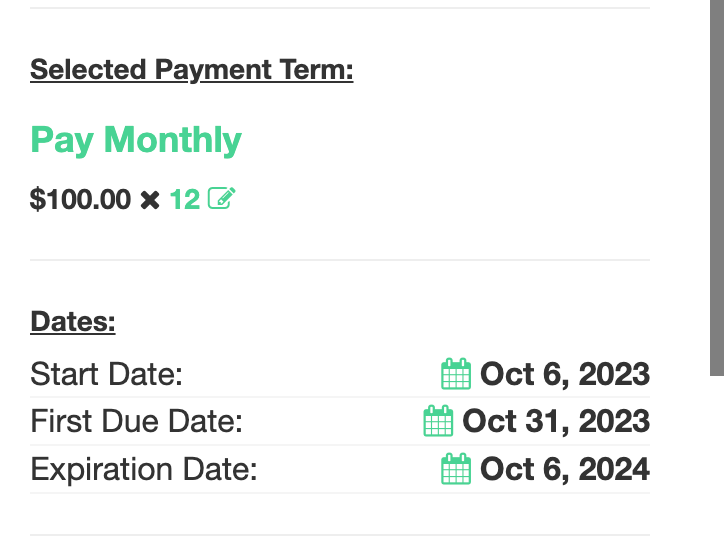
Example: 30-day offset, join date = October 6. Membership starts October 6, 2023. First payment due November 5, 2023.
Fixed first payment date
Use this setting when billing must begin on a specific calendar date, regardless of the join date. This is useful for pre-sale memberships, gym openings, or seasonal program starts.
Example: Fixed payment date = October 31, 2023, join date = October 6. First payment due October 31, 2023.
Membership start date settings #
These settings control when the membership officially begins, independently of payment timing.
- Fixed Start Date: The membership begins on a specific calendar date, regardless of when the member signs up.
- Start Date Offset (Begin Date Offset): The membership begins a defined number of days after the sign-up date.
Copying and duplicating offers #
Once an offer is configured, you can copy it to create a similar offer without starting from scratch. The Copy Offer action is available from within the offer in Offer Builder.
Copying an offer duplicates all current settings, including payment terms and items, into a new inactive offer. You can then rename it, adjust individual settings, and activate it when ready. This is useful when building multiple offers that share the same billing structure but differ in price, length, or access level.
If you need to stop using an offer, it is recommended to deactivate it rather than delete it. Deactivated offers are removed from enrollment options but their history is preserved. Deleting an offer is generally not recommended.
Need help? #
Contact your ASF account manager at clientsupport@asfpaymentsolutions.com.