
What a prospect offer is #
A prospect represents someone interested in your facility but not yet committed to a full membership. Prospect offers are trial or short-term access arrangements that let prospects use the facility and track their information in the system. This article covers setup in Offer Builder, not the legacy Prospects application.
Before you begin #
Ensure your prospect waiver has been uploaded to Generic Terms before creating the offer. The waiver is the terms and conditions that prospects normally sign before accessing the facility. Having it in Generic Terms lets you import it into the offer rather than re-entering it manually.
Creating the offer #
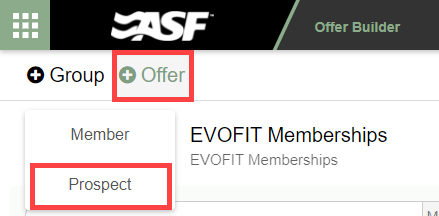
In Offer Builder, select the + Offer button in the top left and choose Prospect.
Offer details: fields unique to prospect offers #
Most of the Offer Details fields work the same as in a member offer. Two fields are specific to prospect offers:
- Default Number of Visits: Sets the maximum number of check-ins allowed for prospects on this offer. Set to 0 for unlimited access.
- Allow Access: Controls whether prospects have facility access. Typically set to Access.
Long description and terms and conditions #
Complete the Long Description and the Terms and Conditions sections as you would for a member offer. To import a previously created prospect waiver, use the Import from Generic Terms option in the Terms and Conditions section.

Payment terms #
Prospect offers do not include Payment Terms. There are no recurring billing charges for prospects. Point of Sale items can be added to create an upfront charge if needed, but recurring add-ons are not available for prospect offers.
Activating the offer #
Once all sections are complete, activate the offer using the toggle in the upper right of the offer page. Active prospect offers appear in Member Enrollment and on the Online Join prospect page automatically.
Need help? #
Contact your ASF account manager at clientsupport@asfpaymentsolutions.com.