
Two methods for membership and add-on taxation #
Member Management supports two distinct methods for applying tax to memberships and add-ons. The method your club uses affects how taxes are displayed during enrollment and on signed contracts.
Method 1: Tax-inclusive pricing #
Membership and add-on pricing includes taxes. The displayed payment amount already incorporates the applicable tax.
- An optional pre-tax amount can display in Online Join.
- Distinct tax rates can be set per membership or add-on.
- No additional Tax Settings configuration is required.
Method 2: Calculated tax breakout at enrollment #
Pricing excludes taxes; calculations occur automatically at sign-up using predefined rates. This method must be enabled for your club by the Client Support team.
When active:
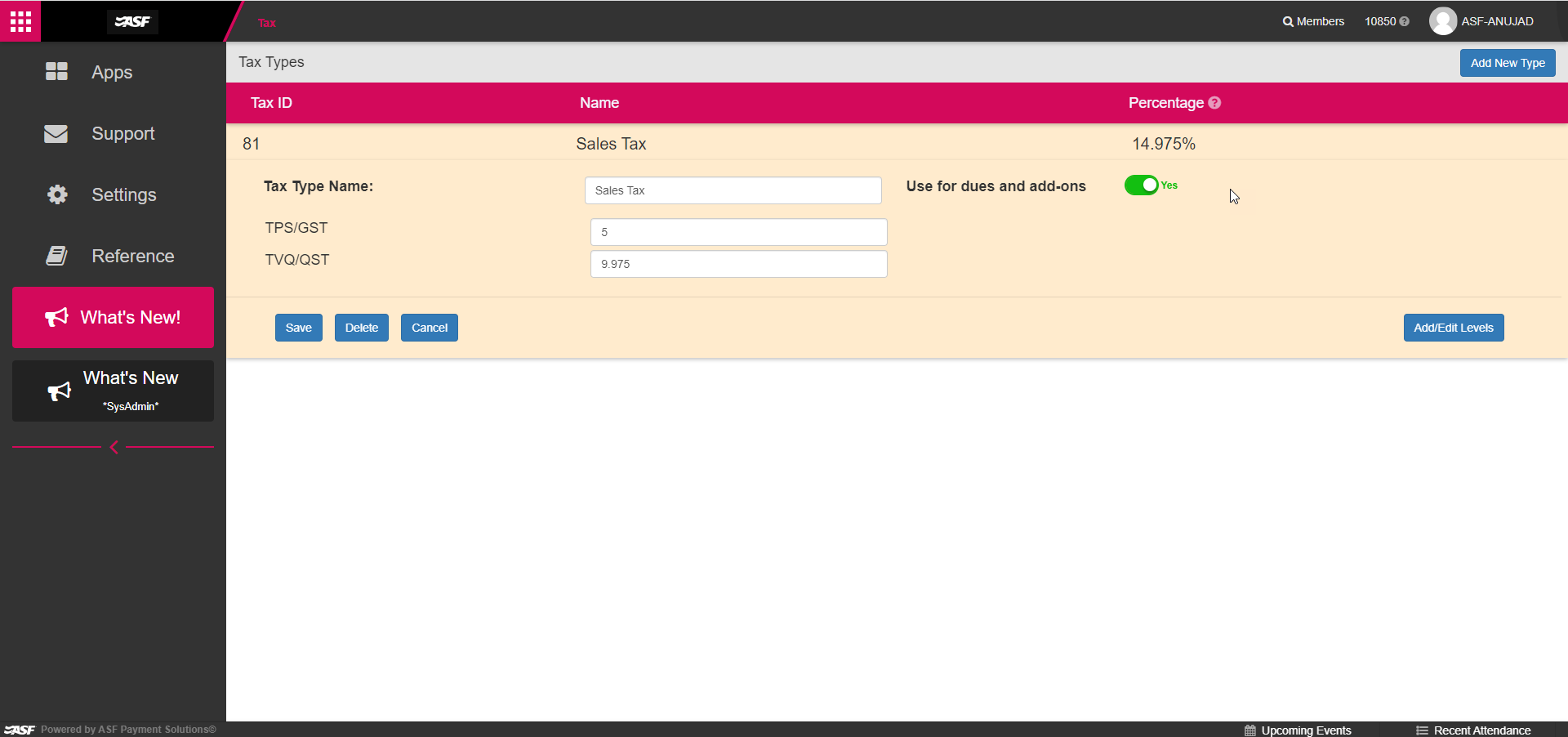
- Applicable taxes are calculated using the designated Tax Type for dues and add-ons.
- Tax displays as individual Tax Level line items (for example, "GST" and "QST").
- Tax appears during enrollment and on signed contracts.
Current limitations:
- All memberships and add-ons are taxed uniformly; distinct rates per item are not supported.
- Tax cannot be applied to memberships or add-ons selectively.
- Prorated membership payment taxation is not supported.
- Auto Term Renewals are not supported with Method 2.
- Point of Sale items maintain independent tax rates and are not affected.
Tax breakout during Online Join #
When Method 2 is active, Online Join displays tax as separate line items.
Due Today section
- A separate line item per Tax Level with calculated amounts.
- Total reflects offer items, sign-up dues, cardholder dues, promotions, and taxes.
- Tax displays at $0.00 if zero but offer items exist; omitted if zero and no offers are present.
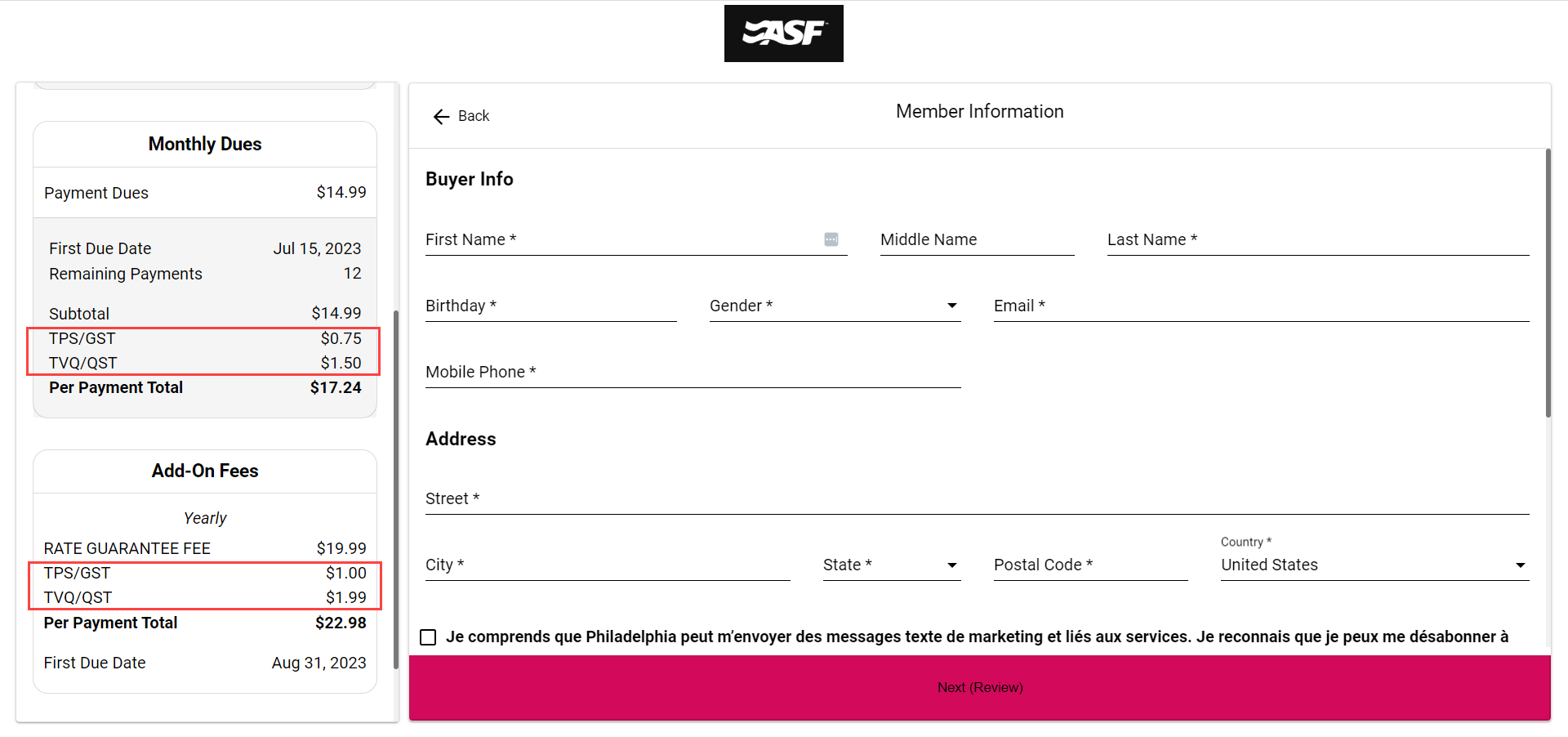
Recurring Dues section
- A Subtotal line for combined Payment Dues and Cardholder Dues.
- Individual Tax Level line items below the subtotal.
- A Per Payment Total including all taxes.
Tax breakout during in-club member enrollment #
The same calculation logic applies for new member enrollment, replacement, renewal, preset renewal, prospect enrollment, and prospect conversion.
Fees Due at Sign Up section
- Individual Tax Level line items with calculated amounts.
- Total reflects offer items, sign-up dues, cardholder dues, adjustments, and taxes.
- Tax Total displays at $0.00 if zero but offer items are included.
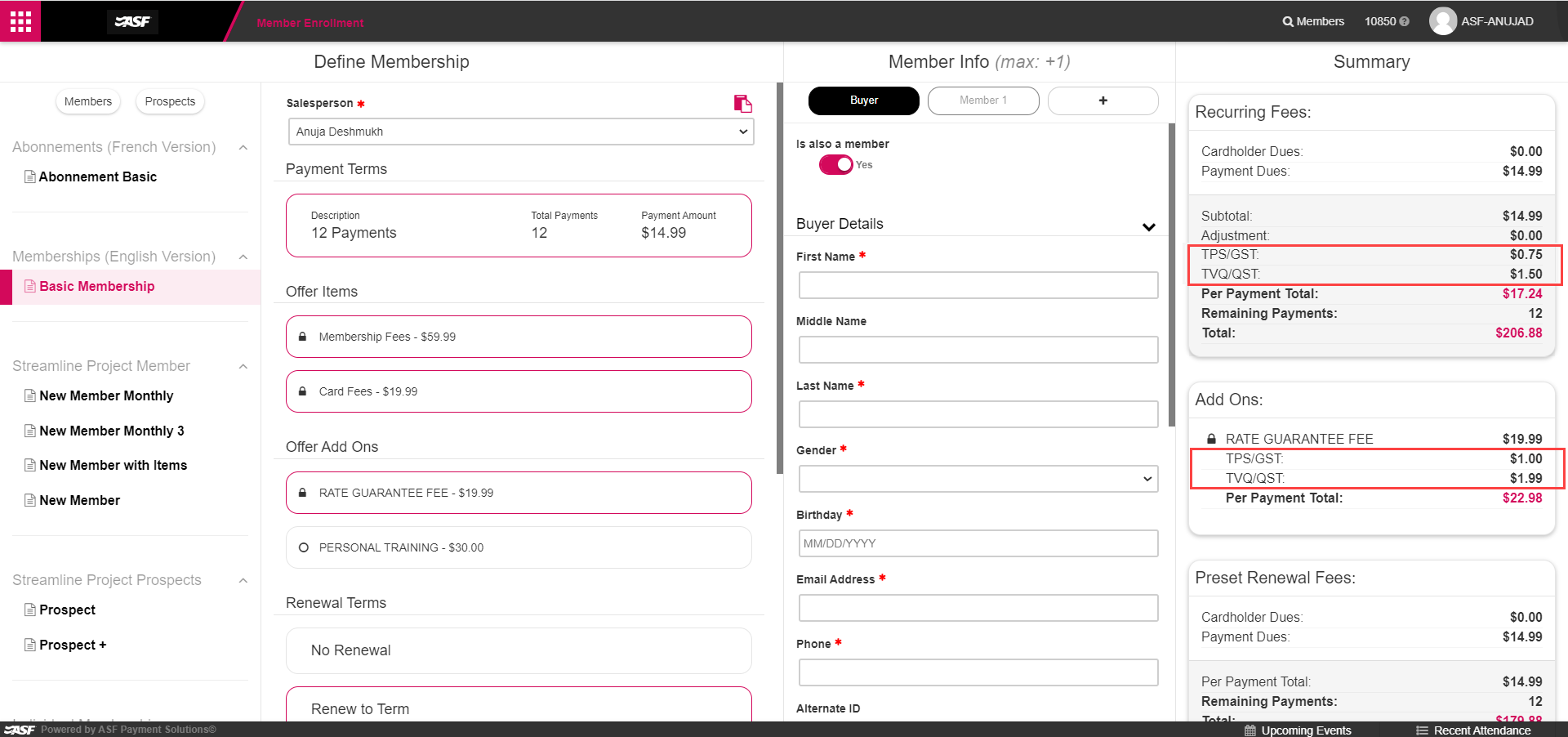
Recurring Fees section
- A Subtotal line for Cardholder Dues and Payment Dues.
- Individual Tax Level line items below.
- A Per Payment Total including taxes.
Tax calculation rule: Taxes are always calculated on the subtotal after promotions and discounts are applied, never on the original pre-discount amounts.
Tax breakout on membership contracts #
The contract template displays an itemized tax breakout in two sections.
Offer Information section
- Down Payment column: total dues at sign-up, including taxes.
- Note Total column: total dues payments owed over the agreement life, including taxes.
Fees Collected At Signup section
- Subtotal: total price of all offer items.
- Promotion/Adjustment: total discount or adjustment amount.
- [Tax Level Name]: calculated tax per Tax Level, one line per level.
- Admin Fee: total admin fee.
- Convenience Fee: total convenience fee.
- Total Collected: grand total including all taxes.
Tax line item rules on contracts:
- Zero total taxes with offer items: a single Tax line displays at $0.00.
- Zero total taxes without offer items: no tax line items shown.
- No designated Tax Type for dues/add-ons: no dues tax calculation occurs.
- Offer items without an assigned Tax Type receive a zero tax rate.
Prospect contracts #
Prospect contracts use the same itemized summary format as membership contracts in the Fees Collected At Signup section. The French Canadian bilingual prospect contract template is also available with the full tax breakout when the "Provide member email communication in Canadian French and English" club preference is enabled.
Frequently asked questions #
Can memberships and retail items have different tax rates?
Yes. The Tax Type designated for dues and add-ons applies to membership and cardholder dues. Individual offer items and POS items can have separate Tax Types assigned.
What if no Tax Type is designated for dues and add-ons?
Dues taxation is disabled. Offer and POS items with individually assigned Tax Types are still taxed at their assigned rates.
Does the tax breakout apply to existing enrollments?
No. Tax breakout applies only to new enrollments processed after the feature is activated. Existing contracts are not affected.
Can tax be applied to memberships only, or to add-ons only?
Not currently. The designated Tax Type applies to both memberships and add-ons simultaneously. Selective application is not supported.
Are Auto Term Renewals compatible with Method 2?
No. Auto Term Renewals are not supported with Method 2 (calculated tax breakout). Use Method 1 (tax-inclusive pricing) for clubs that use Auto Term Renewals.
Need help? #
Contact your ASF account manager at clientsupport@asfpaymentsolutions.com.